Skip to the main content.

Platform

What is Paytronix Guest Engagement Suite?

Combining online ordering, loyalty, omnichannel messaging, AI insights, and payments in one suite. Paytronix delivers relevant, personal experiences, at scale, that help improve your entire digital marketing funnel by creating amazing frictionless experiences.

A Complete Guest Engagement Suite
Online Ordering
Acquire new customers and capture valuable data with industry leading customization features.
Loyalty
Encourage more visits and higher spend with personalized promotions based on individual activity and preferences.
Catering
Grow your revenue, streamline operations, and expand your audience with a suite of catering tools.
CRM
Build great customer relationships with relevant personal omnichannel campaigns delivered at scale.
Artificial Intelligence
Leverage the most data from the most customer transactions to power 1:1 marketing campaigns and drive revenue.
Payments
Drive brand engagement by providing fast, frictionless guest payments.

Solutions


Paytronix Guest Engagement Solutions

We use data, customer experience expertise, and technology to solve everyday restaurant and convenience store challenges.

FlightPaths

FlightPaths are structured Paytronix software onboarding journeys designed to simplify implementation and deliver maximum ROI.


Customer Success Plans

Customer Success Plans (CSPs) are tiered service offerings designed to help you get the most from your Paytronix software, whether you prefer self-guided support or hands-on partnership.  

Contactless Experiences
Accommodate your guests' changing preferences by providing safe, efficient service whether dining-in or taking out.
Customer Insights
Collect guest data and analyze behaviors to develop powerful targeted campaigns that produce amazing results.
Marketing Automation
Create and test campaigns across channels and segments to drive loyalty, incremental visits, and additional revenue.
Mobile Experiences
Provide convenient access to your brand, menus and loyalty program to drive retention with a branded or custom app.

Subscriptions
Create a frictionless, fun way to reward your most loyal customers for frequent visits and purchases while normalizing revenues.
Employee Dining
Attract and retain your employees with dollar value or percentage-based incentives and tiered benefits.
Order Experience Builder
Create powerful interactive, and appealing online menus that attract and acquire new customers simply and easily.

Multi-Unit Restaurant

Loyalty Programs
High-impact customizable programs that increase spend, visit, and engagement with your brand.
Online Ordering
Maximize first-party digital sales with an exceptional guest experience.
Integrations
Launch your programs with more than 450 existing integrations.

Small to Medium Restaurants

Loyalty Programs
Deliver the same care you do in person with all your digital engagements.
Online Ordering
Drive more first-party orders and make it easy for your crew.

Convenience Stores

Loyalty Programs
Digital transformations start here - get to know your guests.
Online Ordering
Add a whole new sales channel to grow your business - digital ordering is in your future.
Integrations
We work with your environment - check it out
Tobacco Reporting
Comply with AGDC 2026 DTP Requirements

Company

About Paytronix

We are here to help clients build their businesses by delivering amazing experiences for their guests.

Meet The Team
Our exceptional customer engagement innovations are delivered by a team of extraordinary people.
News/Press
A collection of press and media about our innovations, customers, and people.
Events
A schedule of upcoming tradeshows, conferences, and events that we will participate in.
Careers
Support
Paytronix Login

Order & Delivery Login

Resources
Paytronix Resources
Learn how to create great customer experiences with our free eBooks, webinars, articles, case studies, and customer interviews.
FlexPoint Service Catalog
Access FlexPoints are a cost-effective, flexible way to access our value-added services, to ensure you get greater impact from your Access software solution.

See Our Product In Action
E-Books
Learn more about topics important to the restaurant and c-store customer experience.
Reports
See how your brand stacks up against industry benchmarks, analysis, and research.
Blog
Catch up with our team of in-house experts for quick articles to help your business.
Case Studies
Learn how brands have used the Paytronix platform to increase revenue and engage with guests.


2026 Trends Predictions Report

The brands winning now aren't competing on price. They're turning every transaction into a relationship. Discover how in the 2026 Trends Predictions Report.

6 min read

5 Tasks That Can Be Automated to Reduce Restaurant Labor Costs

5 Tasks That Can Be Automated to Reduce Restaurant Labor Costs

Manual work consumes much management time in restaurants and c-stores. Scheduling, inventory, operations, marketing, and ordering often involve repetitive tasks that can be automated, creating inefficiencies and extra labor costs. 

These processes don’t just waste valuable time. They increase errors, making it harder to stay consistent as locations scale or staffing changes, ultimately raising costs and operational stress.

With rising minimum wages and ongoing staff shortages, automation is no longer optional. The good news is that modern automation solutions integrate with existing restaurant systems, eliminating the need to build workflows from scratch or rely on information technology (IT) heavy implementations. 

Today’s new tools allow companies to automate tasks operations quickly and affordably. According to the National Restaurant Association’s 2024 State of the Restaurant Industry report, 47% of operators expect technology and automation to become more common as a response to labor shortages. 

This article breaks down how to automate restaurant routine tasks without sacrificing quality or customer experience. You’ll see practical examples, cost-saving benchmarks, return on investment (ROI) timelines, and solutions to help you decide what works for your operation.  

Identifying Restaurant Automation Opportunities  

The restaurant industry is evolving quickly, and automation is creating real opportunities to shift staff focus from manual tasks to customers, food quality, and strategy. The goal isn’t to replace people, but to use technology to automate repetitive tasks that drain time and energy. 

Some automation wins are immediate, like scheduling, mobile ordering, and marketing campaigns, while inventory forecasting and cross-channel integrations take longer but deliver higher long-term impact. 

Streamlined workflows reduce errors and let teams adapt faster when menus, pricing, or staffing models change. Eliminating time-consuming manual processes allows staff for higher-value work that drives revenue. 

Connected platforms matter. Paytronix unites online ordering, loyalty programs, marketing, and customer data as a single source, then automation supports operations without adding silos or complexity. Common mistakes happen without a strategy. Poor integrations, limited training, underusing analytics, and failing to measure progress across different systems.  

What to Automate First in Your Restaurant 

Start small to avoid overwhelming your team. Focus on a few wins that generate labor savings and build confidence before expanding to complex workflows:

  • Review systems you already use. Point-of-sale (POS), payroll, inventory, marketing, ordering, and loyalty platforms reveal where manual work slows operations or introduces inconsistencies. 
  • Identify automation opportunities that replace recurring tasks, not human value. Scheduling is a common starting point when shifts are managed through paper, spreadsheets, or fragmented tools. 
  • Evaluate customer-facing business processes. Online ordering automation reduces friction, sends orders directly to operations, eliminates re-entry human errors, and saves staff time. 
  • Choose tools that match priorities and budget. Many platforms allow testing before full deployment to validate impact. 
  • Apply changes with training in mind. Automation only works when teams understand the task automation tools, trust the process, and see how it supports daily work. 

1. Scheduling and Labor Management 

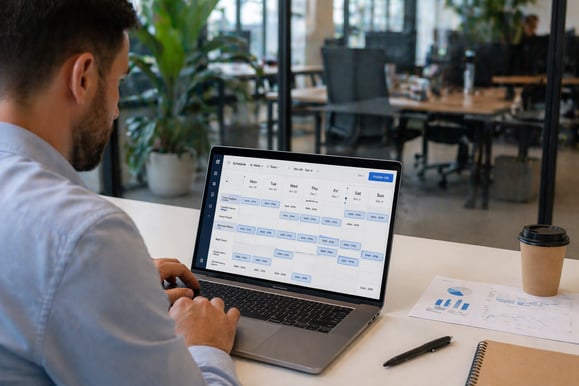
In many multi-location restaurants, replacing spreadsheets with centralized staff scheduling software helps regain control of valuable resources while reducing management overhead. Automating this process allows managers to focus on growth instead of constantly fixing shifts.  

Automate Your Work Schedules 

Modern platforms like 7shifts support smarter task management through AI-driven forecasts, automated shift swaps, time-off requests, and labor law compliance checks. These task management tools reduce friction and eliminate time-consuming tasks that drain managers’ time each week. 

Applicant tracking systems also matter as teams scale. Automating hiring workflows accelerates onboarding for new hires, improves visibility for benefits administration, and supports consistent staffing without overwhelming human resources (HR) teams. Integrated payroll connects scheduling, compliance, and pay accuracy, improving job satisfaction by reducing errors. 

Time Savings and Efficiency Gains 

Automating shift management delivers measurable productivity gains. Restaurants report over five hours saved weekly, fewer shift conflicts, and increased productivity as managers focus on operations instead of fixing calendars. Labor efficiency impacts retention, letting teams invest energy in growth, service quality, and people.

2. Inventory and Ordering Automation 

By connecting inventory systems with point of sale (POS) data gives managers real-time visibility, reduces manual counts, and stabilizes ordering across multiple locations without adding labor. 

Automate Daily Tasks in Inventory 

Modern inventory management software connects directly with POS systems, automatically syncing sales data with stock levels. Par-level monitoring and alerts ensure restocking occurs on time, while automated purchase orders reduce manual follow-ups and supplier errors. 

Waste tracking and recipe costing updates keep margins accurate. Sales sync into inventory tools so ingredient usage and costs update in real time, preventing over-ordering and controlling food cost drift.  

Automated ingredient ordering stabilizes operations. Orders are triggered by actual sales and usage rather than estimates, saving time while keeping kitchens prepared without unnecessary spoilage or excess inventory. 

Improved Ordering and Delivery Experiences 

Efficient inventory directly improves what customers experience when ordering online and through delivery channels. When menus reflect real availability across apps, websites, QR menus, or self-service kiosks, customers complete orders faster and with fewer interruptions.  

Online ordering tools, QR codes, kiosks, and AI-driven ordering flows allow customers to complete orders independently, whether for pickup or delivery. Files and documents needed for menu updates are also handled automatically in some systems.

3. Marketing and Customer Communication 

A fast-casual restaurant noticed that manually sending promotions, replying to reviews, and updating digital menus consumed hours of manager time every day. By using artificial intelligence tools, the team could focus on strategy while maintaining timely, consistent communication with guests. 

Automatic Tasks for Guest Engagement 

Marketing automation tools handle repetitive tasks like scheduling social media posts, sending emails, responding to reviews, generating a new ticket for support issues, and updating your website or chatbots. Customer relationship management (CRM) data tracks preferences and payments, letting staff focus on strategic activities that boost satisfaction and retention. 

Loyalty Program Management Made Simple 

With Paytronix solutions, restaurants and c-stores centralize loyalty and rewards management. Integration with POS and CRM software lets managers keep track of specific accounts, streamline benefits administration, and ensure that promotions, rewards, and digital menu management are consistent across locations. 

Social Media Accounts Management 

Content calendar automation allows teams to post across multiple platforms without manual intervention. Performance tracking tools measure engagement, reach, and conversion metrics, allowing project managers make data-driven decisions that optimize campaigns while reducing labor costs

4. Financial and Administrative Tasks 

For instance, a c-store where managers spend hours reconciling daily sales, distributing tips, and tracking invoices manually. Automation tools can take over these repetitive tasks, giving staff more time for strategic decision-making, workflow automation, and keeping operations running smoothly. 

How to Automate Work Tasks in Accounting 

Software for restaurants can handle both internal and external financial workflows, helping teams reduce errors, streamline task approvals, and save time. Common automation opportunities include:  

  • Invoice processing automation for suppliers and vendors 
  • Tip distribution calculations for staff 
  • Sales report generation and real-time dashboards 
  • Payroll preparation integrated with HR systems 
  • POS and Kitchen Display System (KDS) data integration 
  • Data entry reduction through automated syncing 
  • Cloud-based management for centralized access, reporting, and supporting project management

5. Operational Task Automation

In busy restaurants, managers juggle temperature checks, cleaning schedules, and equipment maintenance manually, leaving little time for strategic decisions. Automated processes turn these tasks into reliable workflows that save time and reduce errors. 

How to Automate Daily Tasks in Operations 

When using each task automation tool, your staff can complete tasks efficiently while maintaining consistency. Examples include: 

  • Temperature monitoring systems that log readings and alert managers automatically.
  • Cleaning schedule management can automatically send notifications and track completion.
  • Equipment maintenance alerts for preventive service.
  • Supplier communications with automated order reminders and confirmations.

Reducing Manual Work 

Robotic process automation (RPA) helps teams finish manual tasks and tedious tasks with minimal supervision. Custom workflows allow both complex and simple tasks to follow consistent procedures, including built-in error handling, freeing staff to focus on higher-value work.  

Implementation Strategy  

No automation strategy is perfect from the start, but getting your plan in motion is crucial. Applying what you’ve learned ensures your team transitions from handling repetitive tasks to focusing on meaningful work, improving both efficiency and overall operations. 

Starting Your Automation Journey 

Begin by identifying different tasks across scheduling, inventory, marketing, operations, and finance for automating tasks first. Prioritize those with the highest impact, and use pre-built templates or automated workflows to streamline setup. 

Resource allocation should consider staff time, technology costs, employee onboarding for new systems, and IT operations. A simple setup allows teams to adopt tools faster. Staff training is critical: your team must understand how the tools work and how automation supports roles rather than replacing them. 

Track consistent results from early wins. Popular apps and tools can generate new leads, reduce errors, and free staff from mundane tasks across multiple job sites. Over time, this approach strengthens team morale and creates an environment where everyone spends more time on work that drives your business forward. 

Frequently Asked Questions About Automated Tasks 

Automation can feel confusing at first. Understanding the basics helps you decide which tasks belong in your restaurant or c-store workflows before investing time and money into a plan.  

What type of business-to-consumer (B2C) tasks can be automated? 

Many business tasks that repeat often and follow clear rules are good candidates for automation. In B2C operations such as restaurants and c-stores, examples include order processing, scheduling, inventory updates, customer notifications, marketing outreach, and sales reporting.  

What are the 4 types of automation? 

Restaurant automation generally falls into four areas. Customer-Facing Ordering, which speeds up guest orders; Front-of-House Operations, covering staff workflows and table management; Back-Office, managing kitchen prep and inventory; and Management & Admin, streamlining scheduling, payroll, and reporting. 

Which tasks can’t be automated by AI? 

Some work still requires human intervention, empathy, and creativity. Complex tasks like coaching employees, navigating ambiguous service issues, company strategies and negotiations, or crisis decision-making often need people because they involve context, emotion, or nuanced reasoning that machines cannot reliably replicate. 

What's the 30% rule in AI? 

A practical rule of thumb in automation planning suggests that about 30% of daily business activities are suitable for automation. These tasks typically follow consistent patterns and clear rules that current technology can handle reliably. The remaining 70% still requires human judgment and oversight to maintain quality and ensure smooth operations. 

Your 30-Day Automation Plan 

This article gives you a clear roadmap to explore automation potential in your restaurant or convenience storeA structured 30-day plan lets you prioritize tasks, allocate resources effectively, and see early cost savings while boosting employee satisfaction and operational efficiency. 

  • Week 1: Identify and prioritize the most repetitive or time-consuming everyday tasks.  
  • Week 2: Select and set up top tools such as Paytronix solutions that fit your workflow.  
  • Week 3: Train your team to use automated systems confidently.  
  • Week 4: Measure results using key metrics to guide future project planning and uncover additional significant benefits. 

Are you ready to transform your business? Book a demo with Paytronix experts to start your automation initiatives, and download the 2025 Economic Resilience Toolkit to discover how to grow margins and keep your guests coming back. 

6 Proven Subscription Provider Tactics Driving B2C Growth

19 min read

6 Proven Subscription Provider Tactics Driving B2C Growth

The subscription economy is reshaping how business-to-consumer (B2C) businesses, including restaurants, retail, and convenience stores, operate. ...

Read More
5 Types of Software You Need for Your QSR or FSR Restaurant

15 min read

5 Types of Software You Need for Your QSR or FSR Restaurant

Fragmented software across different departments can lead to inefficiencies, miscommunication, and missed opportunities to act on real-time...

Read More
What Is the Most Used Loyalty Software? 5 Insights from B2C

21 min read

What Is the Most Used Loyalty Software? 5 Insights from B2C

Loyalty isn’t what it used to be. Sure, your dog has it, and your regulars probably do too. But even loyal guests lose patience when your app freezes...

Read More