TL;DR: A catering invoice is a detailed billing document that breaks down services, costs, and payment terms for an event-based order. Because catering often involves deposits, headcount changes, and variable event costs, invoices need to clearly track what was agreed on, what was delivered, and what is still owed.
- Why it matters: Catering revenue is often tied to large, one-off events where small invoicing errors, such as missing deposits or unclear overages, can create cash flow delays or disputes.
- Who this is for: Catering business owners, event planners, and operators managing client billing for weddings, corporate events, or private functions.
- Who can skip this: Very small-scale operators doing informal or cash-on-delivery catering without formal contracts or structured billing.
- What you’ll walk away with: A clear understanding of what belongs in a professional catering invoice, how deposits and final payments are structured, and how invoices differ from quotes or proposals.
- Most common next step: Standardizing your invoice template so deposits, adjustments, and final balances are always tracked consistently.
A strong catering invoice template makes billing east and builds client relationships. In an industry where payments are key to cash flow, having a clear invoice:
If you have a catering company, you need the right invoice template.
Not sure what your catering invoice template should look like? You’re in the right place. Read on to explore:
What is a Catering Invoice Template?
A catering invoice template is a pre-designed document. It helps caterers keep and ask for payment for their services. It includes all necessary details about the catering job. This template simplifies the billing process. It reduces the time spent creating invoices from scratch and maintains transaction accuracy.
Here are three benefits of a catering invoice template:
- Professionalism: A formatted invoice makes your catering business look professional.
- Clarity: Both you and your clients understand the services, pricing, and payment requests.
- Legal Protection: An invoice provides a paper trail, reducing conflicts and making sure everything is legal.
6 Parts of a Catering Invoice
A catering invoice template must include these six components:
- Date and Invoice Number: Each invoice should include a date and an invoice number to easily track.
- Client Details: Include the client’s name, contact info, and billing address.
- List of Catering Services: Outline each catering service provided, including the catering menu, food, drinks, and additional services.
- Prices and Total Cost: List the price for each service and add the total cost.
- Payment Terms: Explain catering payment methods (e.g., credit card payments, bank transfers) and payment terms.
- Due Date: State the payment due date for timely payments.
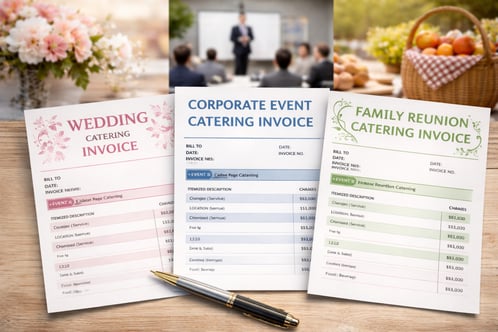
Customizing Your Invoice Template for Different Events
Different catering events need special details on the invoice to show the specifics of the event. Whether you’re catering a wedding, corporate event, or family gathering, here are some tips.
Invoices for Weddings
- Changing Your Basic Template: Customize your basic template by adding sections for wedding-specific details, such as "Special Requests" and "Additional Services." Add an “Event Date” field and a “Wedding Planner Contact” section to keep info easy to reference.
- Menu Breakdown: List the menu items chosen, including any special dietary options.
- Additional Services: If you offer additional services, list them separately with descriptions and pricing.
- Service Charges and Tips: Specify any service fees, tips, or additional charges not included in the quote. Also, add a clear payment request, so clients aren't surprised later.
Invoices for Corporate Events
- Changing Your Basic Template: Change your basic template by including a section for meal types. You can also include catering staffing and equipment details. Add a breakdown of extra services, like AV equipment or waitstaff.
- Number of Guests: Include the guest count. Add an option for adjustments in case of last-minute changes.
- Meal Types and Customizations: If there are multiple meal options (e.g., vegetarian, gluten-free), list them separately.
- Staff and Equipment: If extra staff or audio-visual (AV) equipment were provided, add them. This break avoids arguments over fees.
Invoices for Private Events
- Changing Your Basic Template: Add fields for menu requests or special dietary needs to your basic template.
- Special Requests: If there are any, make sure they are mentioned.
- Customized Menu Items: List custom menu items and any changes to standard offerings.
- Unique Setups: For special event setups like custom seating arrangements, include these details.
3 Benefits of Automating Your Invoicing
Use invoicing software or online invoice generators to
Here are three benefits of automating your invoicing:
- Reduce Errors: Automating calculations and invoice creation reduces human error.
- Save Time: Make invoices in minutes, freeing up time to focus on other aspects of your catering business.
- Improved Records: Invoicing software helps you track payments and organize financial records for taxes.
Popular invoice generators and invoicing software include Odoo and Zoho. These platforms offer easy templates and automations. Use them to create, customize, and send professional invoices for your catering services.
4 Best Practices for Invoice Management
Invoice management helps continue cash flow and get timely payments. Here are four best practices to help:
- Regular Updates: Keep your invoices up to date, especially when there are changes to services or prices.
- Timely Submissions: Send invoices right after an event so clients know when payment is due.
- Follow Up on Late Payments: Track late invoices and follow up to reduce slow payments.
- Keep Records: Track your invoices and payments for correct tax records.
5 Mistakes to Avoid When Making Invoices
Mistakes on your catering invoices can lead to slow payment or confusion. Here are five common mistakes to avoid:
- Get Approvals: Check on necessary approvals, such as signed contracts or confirmed service details. Get these before sending the invoice.
- Missing Details: Not including details such as payment terms, invoice number, or a list of services can lead to arguments.
- Wrong Pricing: Check prices before sending an invoice to ensure they are the agreed-upon amounts.
- Not Confirming Payment Methods: Always confirm accepted payment methods to prevent payment issues.
- Leaving Off Due Dates: Without a payment due date, clients may delay payments.
Use Branding on Your Invoices
A branded invoice is an important tool. It creates recognition and trust with your clients. By adding your brand details, you reinforce your identity.
Adding branding to your invoices makes your business memorable. A good visual identity makes your invoices recognizable. This creates professionalism, which improves your business’s credibility.
Your invoices are subtle marketing. By adding your business’s contact details, social media handles, and website, you're giving clients access to additional info. Your invoices can be used to boost your marketing reach and brand image.
3 Legal Thoughts for Catering Invoices
Catering invoices must comply with local tax laws and regulations. Here are three legal thoughts to keep in mind:
- Adding Terms of Service: Include disclaimers or policies about cancellations, refunds, or charges. This makes sure clients know their rights and obligations to reduce arguments.
- Taxes: Invoices must match local tax laws. Learn the tax rates in your area and calculate correctly. Check if your catering business is required to register for tax purposes. If so, add your tax ID number on the invoice.
- Clear Payment Terms: Outline your payment terms to avoid misunderstandings. Confirm your clients know when payments are due. Make it clear if payments are due now, within a set number of days (e.g., 30 days), or when they get the invoice.
Frequently Asked Questions About Catering Invoice Templates
What should always be included on a professional catering invoice?
A professional catering invoice should always include client details, event information, itemized services, pricing, taxes, and payment terms. This ensures both parties clearly understand what was delivered and what is being charged. Most catering invoices also include an invoice number, due date, and a breakdown of services such as food, staffing, equipment, and delivery.
How do catering businesses handle deposits and final payments on invoices?
Catering businesses typically split invoices into an upfront deposit and a final balance due before or after the event. The deposit is used to secure the booking and cover early preparation costs, such as ingredients and staffing. The final invoice is usually adjusted based on the confirmed guest count and any changes to services. Many caterers issue a separate invoice for the remaining balance close to the event date to reflect final numbers accurately.
What is the difference between a catering quote, a proposal, and an invoice?
A quote estimates the cost, a proposal outlines the planned service, and an invoice requests payment for services delivered or confirmed. Each serves a different stage of the sales and delivery process. A quote is usually non-binding and can change, while a proposal includes more detail on menus, staffing, and event structure. An invoice is the final financial document that itemizes actual charges and payment terms once services are confirmed or completed.
How do you invoice a client for a catering event that runs over budget?
You issue a revised or additional invoice that reflects the extra costs beyond the original agreement. This typically happens when guest counts increase, additional services are added, or event timing extends. Most caterers document these changes during the event and confirm them with the client before issuing the final invoice. Clear communication and written approval help avoid disputes and ensure the extra charges are expected.
What catering invoice software or templates do professional caterers typically use?
Most professional caterers use invoicing software or customizable templates that allow them to itemize food, labor, and event costs. Tools like QuickBooks, Zoho, and dedicated catering invoice templates are commonly used to streamline billing and track payments. These systems help automate calculations, manage deposits, and send reminders for outstanding balances.
Making Your Invoice Template
A strong catering invoice template is needed for better business operations and smooth transactions. By providing clear invoices, you:
-
Prevent confusion
-
Speed up payments
-
Improve client happiness
Ready to take your catering services to the next level? Book a demo to learn how Paytronix catering solutions streamlines your business and improves guest happiness.

 Julia Bigwood




 Michelle Casey : Nov 22, 2024